

This guide shows you how to transcode a source movie file to a EXR sequence. We can use Nuke to have full control how to transcode the EXRs, e.g. the color management, compression, adding metadata, etc.
-
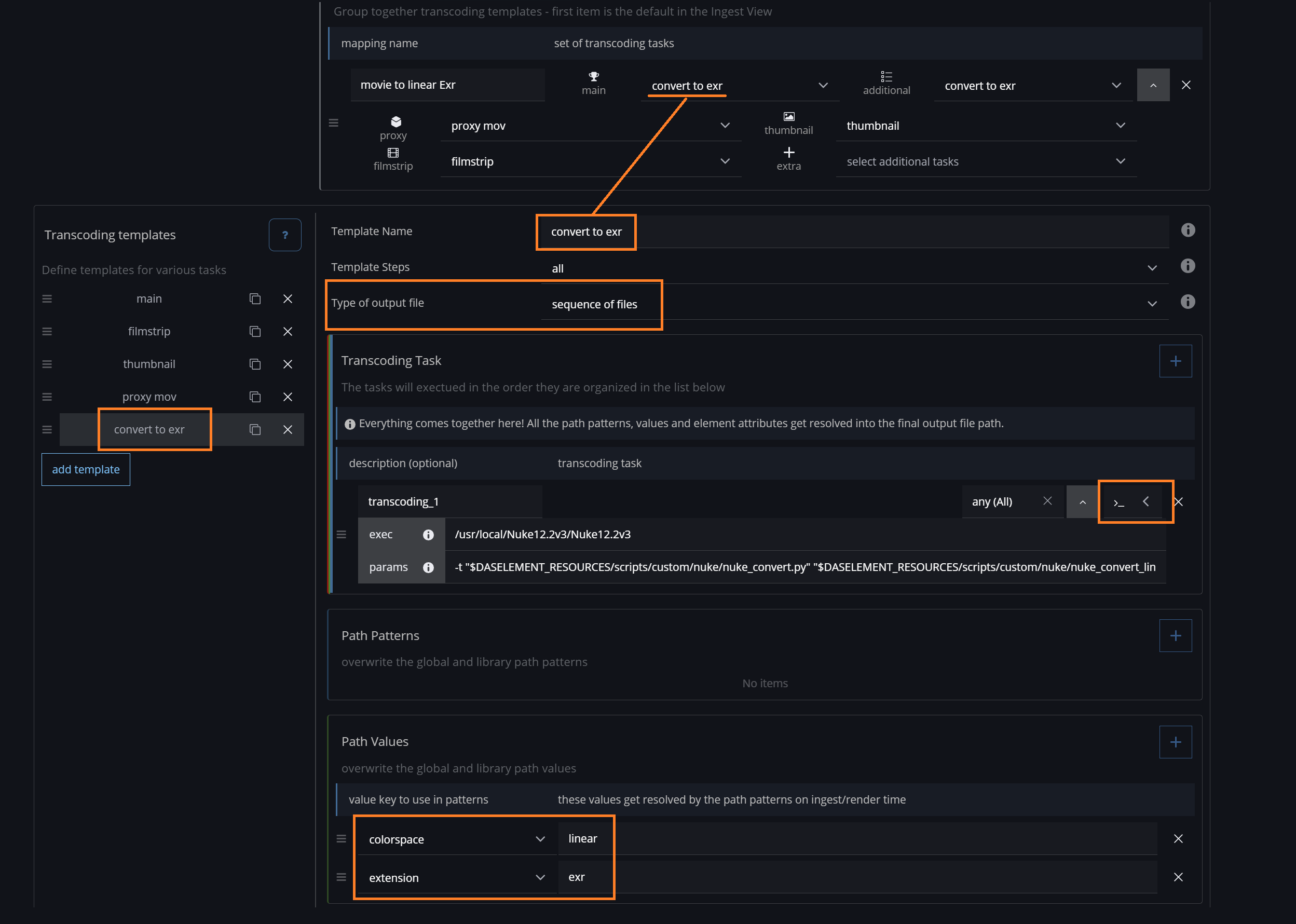
in the library settings - create a new Transcoding template
-
change the Type of output file to sequence of files (this will output the element path as a sequence notation with a frame counter)
-
add a Transcoding Task and change the type to Custom Command (right side next to the cross icon)
-
input here for exec and params these example values (adjust them to your pipeline)
-
exec
/usr/local/Nuke12.2v3/Nuke12.2v3 -
params
-t "$DASELEMENT_RESOURCES/scripts/custom/nuke/nuke_convert.py" "$DASELEMENT_RESOURCES/scripts/custom/nuke/nuke_convert_lin2lin.nk" "<source.directory>/<source.filename>" "<path>" <source.frame_first> <source.frame_last> <frame_first> <frame_last>
-
-
-
add two Path Values and overwrite the colorspace with e.g. linear and extension to exr
-
assign this Transcoding template to a Template mapping and also set the proxies (thumbnail/filmstrip/proxy)
It should look something like this:
Example Nuke scripts:
https://github.com/das-element/resources/tree/main/scripts/custom/examples/nuke
Here is an example command line (exec & params) to send the transcoding jobs to the renderfarm Deadline:
exec
/opt/Thinkbox/Deadline10/bin/deadlinecommand
params
-SubmitCommandLineJob -executable "/usr/local/Nuke12.2v3/Nuke12.2v3" -arguments "-t \"$DASELEMENT_RESOURCES/scripts/custom/nuke/nuke_convert.py\" \"$DASELEMENT_RESOURCES/scripts/custom/nuke/nuke_convert_lin2lin.nk\" \"<source.directory>/<source.filename>\" \"<path>\" <source.frame_first> <source.frame_last> <frame_first> <frame_last>" -name "[das element] <name> - main" -prop BatchName="[das element] <name>" -priority 50 -prop OutputDirectory0=\"<paths.main.directory>\" -prop OutputFilename0=\"<paths.main.filename>\"